> ## Documentation Index
> Fetch the complete documentation index at: https://docs.ruoli.dev/llms.txt
> Use this file to discover all available pages before exploring further.
# 充值与计费
> 了解 ruoli 的计费方式和充值方法
## 计费方式
ruoli 按实际 token 用量计费,费用计算公式:
```
费用 = 分组倍率 × 模型倍率 × (输入 tokens + 输出 tokens × 输出倍率)
```
* **分组倍率**:你的令牌所在分组的倍率(见[模型与分组](/platform/models-and-groups))
* **模型倍率**:不同模型有不同的基础定价
在 [定价页面](https://ruoli.dev/pricing) 可以查看具体的模型价格:
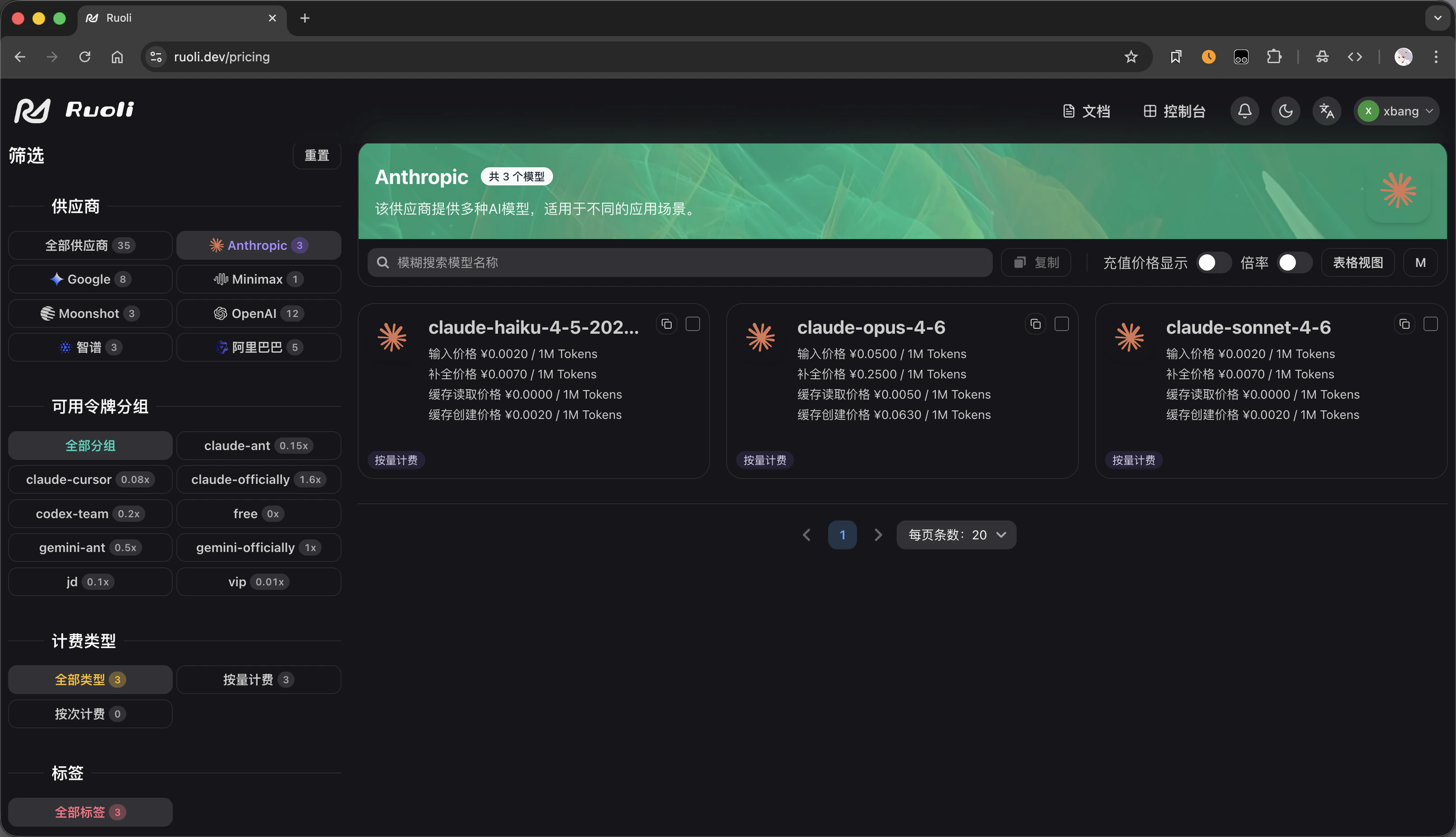 * **输出倍率**:输出 token 通常比输入 token 贵
## 充值
在控制台的 **钱包** 页面充值:
1. 登录 [ruoli.dev](https://ruoli.dev)
2. 进入 **钱包** 页面
3. 输入充值金额
4. 选择支付方式完成充值
也可以通过**兑换码**充值——在钱包页面输入兑换码即可到账。
## 查看用量
在控制台可以查看:
* **仪表盘**:总体用量趋势、模型分布、请求次数
* **日志**:每一次 API 调用的详细记录(模型、token 数、费用)
* **输出倍率**:输出 token 通常比输入 token 贵
## 充值
在控制台的 **钱包** 页面充值:
1. 登录 [ruoli.dev](https://ruoli.dev)
2. 进入 **钱包** 页面
3. 输入充值金额
4. 选择支付方式完成充值
也可以通过**兑换码**充值——在钱包页面输入兑换码即可到账。
## 查看用量
在控制台可以查看:
* **仪表盘**:总体用量趋势、模型分布、请求次数
* **日志**:每一次 API 调用的详细记录(模型、token 数、费用)