> ## Documentation Index
> Fetch the complete documentation index at: https://docs.ruoli.dev/llms.txt
> Use this file to discover all available pages before exploring further.
# Claude Code
> 在 Claude Code 中配置 ruoli
[Claude Code](https://code.claude.com/docs) 是 Anthropic 出品的 AI 编码代理,在终端中读取代码、编辑文件、运行命令。
## 安装
```bash theme={null}
curl -fsSL https://claude.ai/install.sh | bash
```
## 使用 CC Switch 配置(推荐)
打开 [CC Switch](https://ccswitch.lovable.app),选择顶部 **Claude** 标签,点击 **+** 添加配置:
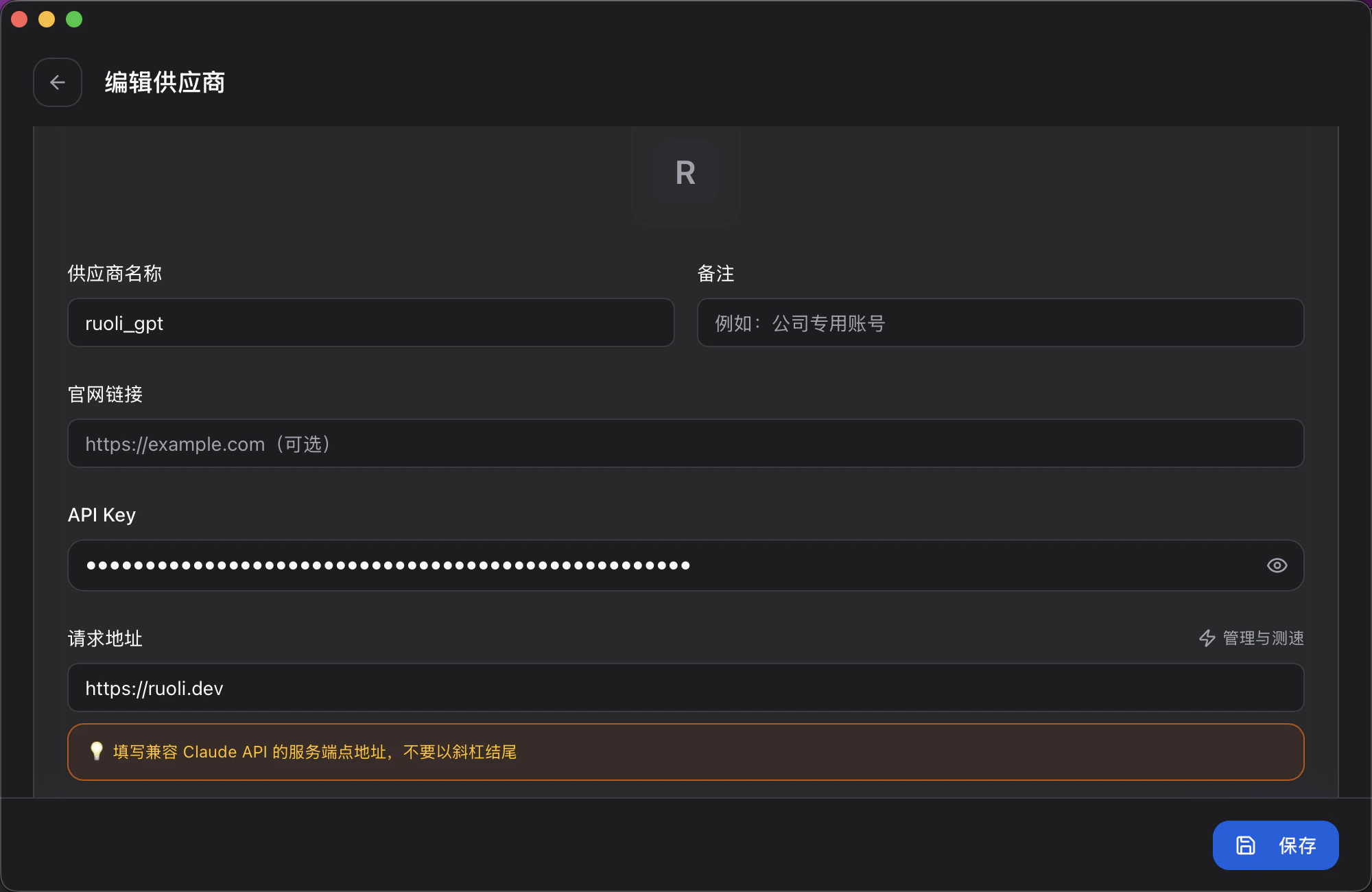 | 字段 | 填写内容 |
| ------- | -------------------- |
| 供应商名称 | 自定义,如 `ruoli_claude` |
| API Key | 你的 Key |
| 请求地址 | `https://ruoli.dev` |
Claude Code 的请求地址是 `https://ruoli.dev`,**不带** `/v1`。
## 切换模型
除了 Claude 原生模型,ruoli 还接入了 `gpt-5.5`、GLM、Kimi、DeepSeek 等第三方模型。在 CC Switch 打开「编辑供应商 → 模型映射」,把 Claude 的别名指向你想用的模型,保存即可生效,无需改 JSON。
| 字段 | 填写内容 |
| ------- | -------------------- |
| 供应商名称 | 自定义,如 `ruoli_claude` |
| API Key | 你的 Key |
| 请求地址 | `https://ruoli.dev` |
Claude Code 的请求地址是 `https://ruoli.dev`,**不带** `/v1`。
## 切换模型
除了 Claude 原生模型,ruoli 还接入了 `gpt-5.5`、GLM、Kimi、DeepSeek 等第三方模型。在 CC Switch 打开「编辑供应商 → 模型映射」,把 Claude 的别名指向你想用的模型,保存即可生效,无需改 JSON。
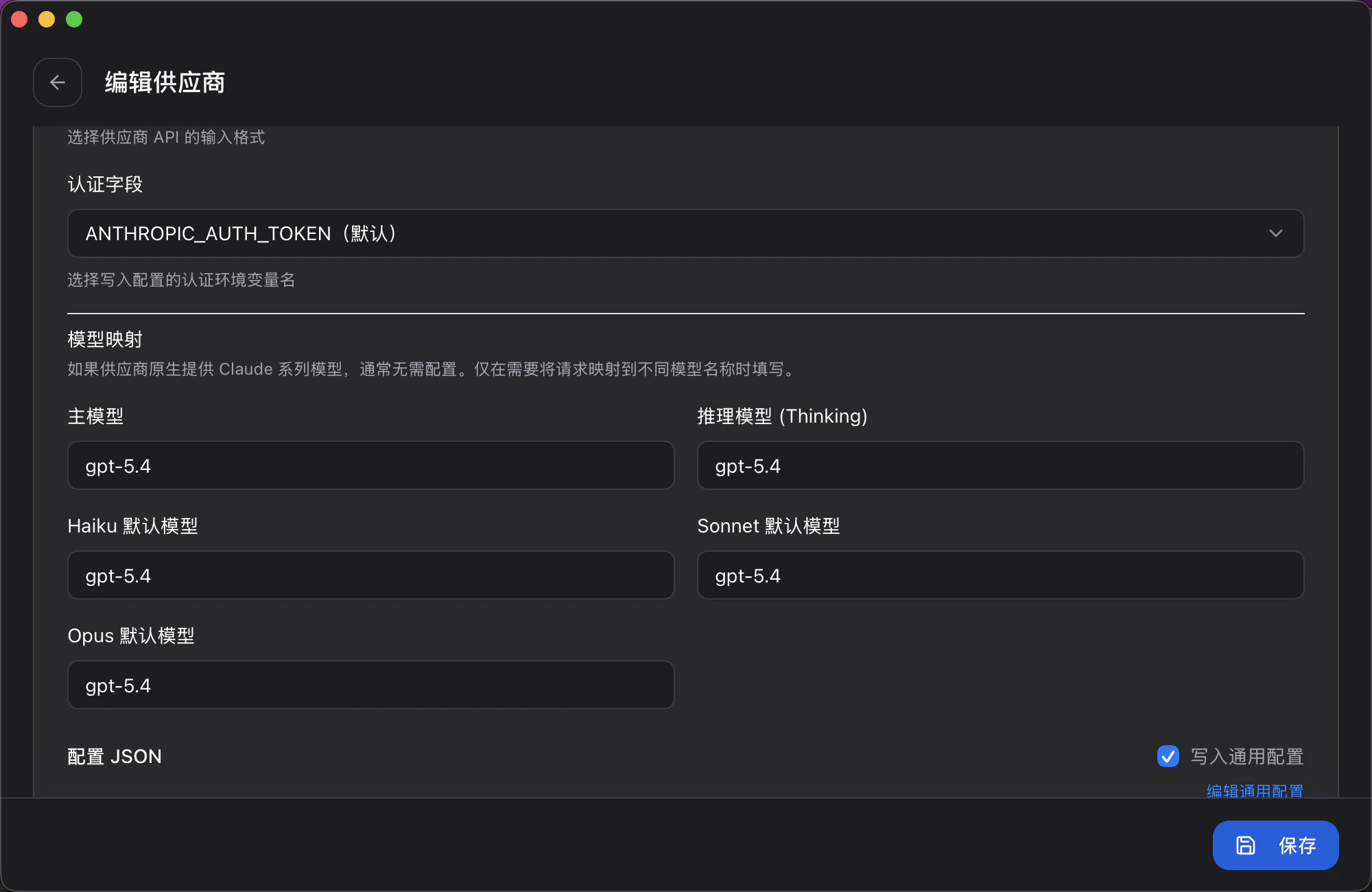 | 字段 | 作用 |
| --------------- | ------------------------- |
| 主模型 | Claude Code 默认调用的模型 |
| 推理模型 (Thinking) | 开启深度思考 / Reasoning 时使用的模型 |
| Haiku 默认模型 | `haiku` 别名对应的目标模型 |
| Sonnet 默认模型 | `sonnet` 别名对应的目标模型 |
| Opus 默认模型 | `opus` 别名对应的目标模型 |
如果供应商原生就是 Claude 模型,这几项可留空 —— 仅在需要把别名指向其他模型时填写。
## 关闭归属 Header
Claude Code 默认在每次请求里注入动态的归属 header(包含会话 ID 等),会**彻底击穿上游 prompt cache** —— 缓存命中率暴跌、费用上涨、响应变慢。
不论用 Claude 官方模型还是 GLM / Kimi / DeepSeek 等第三方模型,**都必须关闭**。
在 CC Switch「编辑供应商 → 配置 JSON」的 `env` 里加一行:
```json theme={null}
"CLAUDE_CODE_ATTRIBUTION_HEADER": "0"
```
| 字段 | 作用 |
| --------------- | ------------------------- |
| 主模型 | Claude Code 默认调用的模型 |
| 推理模型 (Thinking) | 开启深度思考 / Reasoning 时使用的模型 |
| Haiku 默认模型 | `haiku` 别名对应的目标模型 |
| Sonnet 默认模型 | `sonnet` 别名对应的目标模型 |
| Opus 默认模型 | `opus` 别名对应的目标模型 |
如果供应商原生就是 Claude 模型,这几项可留空 —— 仅在需要把别名指向其他模型时填写。
## 关闭归属 Header
Claude Code 默认在每次请求里注入动态的归属 header(包含会话 ID 等),会**彻底击穿上游 prompt cache** —— 缓存命中率暴跌、费用上涨、响应变慢。
不论用 Claude 官方模型还是 GLM / Kimi / DeepSeek 等第三方模型,**都必须关闭**。
在 CC Switch「编辑供应商 → 配置 JSON」的 `env` 里加一行:
```json theme={null}
"CLAUDE_CODE_ATTRIBUTION_HEADER": "0"
```
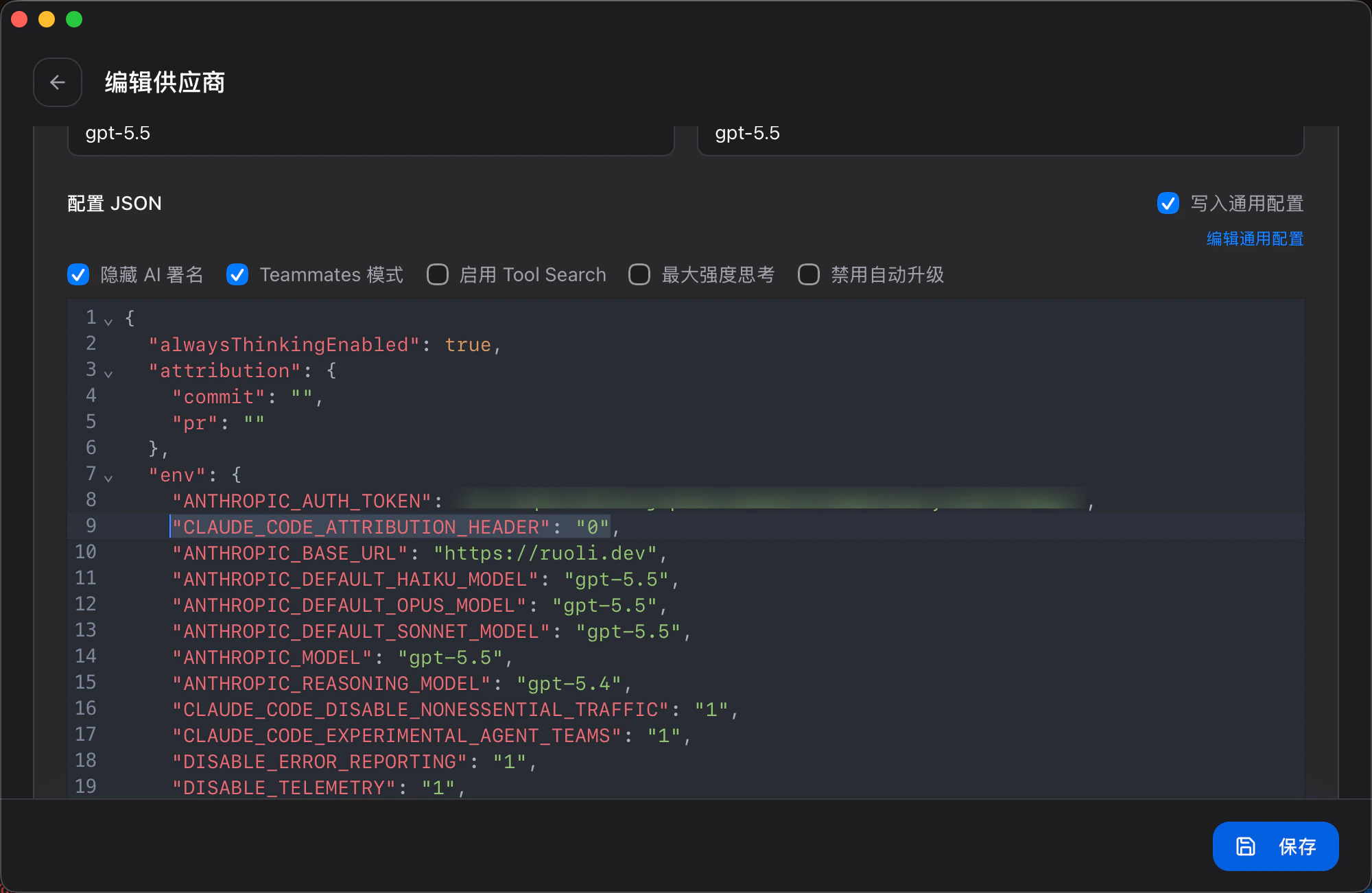 手动配置 `~/.claude/settings.json` 时同理,见下方示例。
## 手动配置
编辑 `~/.claude/settings.json`:
```json theme={null}
{
"env": {
"ANTHROPIC_BASE_URL": "https://ruoli.dev",
"ANTHROPIC_AUTH_TOKEN": "sk-你的KEY",
"CLAUDE_CODE_ATTRIBUTION_HEADER": "0"
}
}
```
或通过环境变量:
```bash theme={null}
export ANTHROPIC_BASE_URL=https://ruoli.dev
export ANTHROPIC_AUTH_TOKEN=sk-你的KEY
export CLAUDE_CODE_ATTRIBUTION_HEADER=0
```
## 配置上下文压缩
Claude Code 默认在上下文窗口使用约 83% 时自动压缩。如果你使用 1M 上下文窗口,可以通过 `CLAUDE_AUTOCOMPACT_PCT_OVERRIDE` 调整压缩触发时机。
例如,希望在 180k tokens 时触发压缩(180k / 1000k = 18%):
在 `~/.claude/settings.json` 的 `env` 中添加:
```json theme={null}
{
"env": {
"CLAUDE_AUTOCOMPACT_PCT_OVERRIDE": "18"
}
}
```
或临时设置环境变量:
```bash theme={null}
export CLAUDE_AUTOCOMPACT_PCT_OVERRIDE=18
```
| 值 | 1M 窗口下触发时机 | 适合场景 |
| ---- | ----------------- | ---------- |
| `18` | \~180k tokens | 频繁保持干净上下文 |
| `50` | \~500k tokens | 平衡性能和上下文保留 |
| `83` | \~830k tokens(默认) | 最大化上下文利用 |
只能将阈值设置为低于 83% 的值。设置高于 83% 的值会被静默忽略。
**官方文档**:[code.claude.com/docs](https://code.claude.com/docs)
手动配置 `~/.claude/settings.json` 时同理,见下方示例。
## 手动配置
编辑 `~/.claude/settings.json`:
```json theme={null}
{
"env": {
"ANTHROPIC_BASE_URL": "https://ruoli.dev",
"ANTHROPIC_AUTH_TOKEN": "sk-你的KEY",
"CLAUDE_CODE_ATTRIBUTION_HEADER": "0"
}
}
```
或通过环境变量:
```bash theme={null}
export ANTHROPIC_BASE_URL=https://ruoli.dev
export ANTHROPIC_AUTH_TOKEN=sk-你的KEY
export CLAUDE_CODE_ATTRIBUTION_HEADER=0
```
## 配置上下文压缩
Claude Code 默认在上下文窗口使用约 83% 时自动压缩。如果你使用 1M 上下文窗口,可以通过 `CLAUDE_AUTOCOMPACT_PCT_OVERRIDE` 调整压缩触发时机。
例如,希望在 180k tokens 时触发压缩(180k / 1000k = 18%):
在 `~/.claude/settings.json` 的 `env` 中添加:
```json theme={null}
{
"env": {
"CLAUDE_AUTOCOMPACT_PCT_OVERRIDE": "18"
}
}
```
或临时设置环境变量:
```bash theme={null}
export CLAUDE_AUTOCOMPACT_PCT_OVERRIDE=18
```
| 值 | 1M 窗口下触发时机 | 适合场景 |
| ---- | ----------------- | ---------- |
| `18` | \~180k tokens | 频繁保持干净上下文 |
| `50` | \~500k tokens | 平衡性能和上下文保留 |
| `83` | \~830k tokens(默认) | 最大化上下文利用 |
只能将阈值设置为低于 83% 的值。设置高于 83% 的值会被静默忽略。
**官方文档**:[code.claude.com/docs](https://code.claude.com/docs)