> ## Documentation Index
> Fetch the complete documentation index at: https://docs.ruoli.dev/llms.txt
> Use this file to discover all available pages before exploring further.
# Codex
> 在 OpenAI Codex CLI 中配置 ruoli
[Codex](https://github.com/openai/codex) 是 OpenAI 出品的 AI 编码代理,在终端中运行。
## 安装
```bash theme={null}
npm install -g @openai/codex
```
## 使用 CC Switch 配置(推荐)
打开 [CC Switch](https://ccswitch.lovable.app),选择顶部 **Codex** 标签,点击 **+** 添加配置:
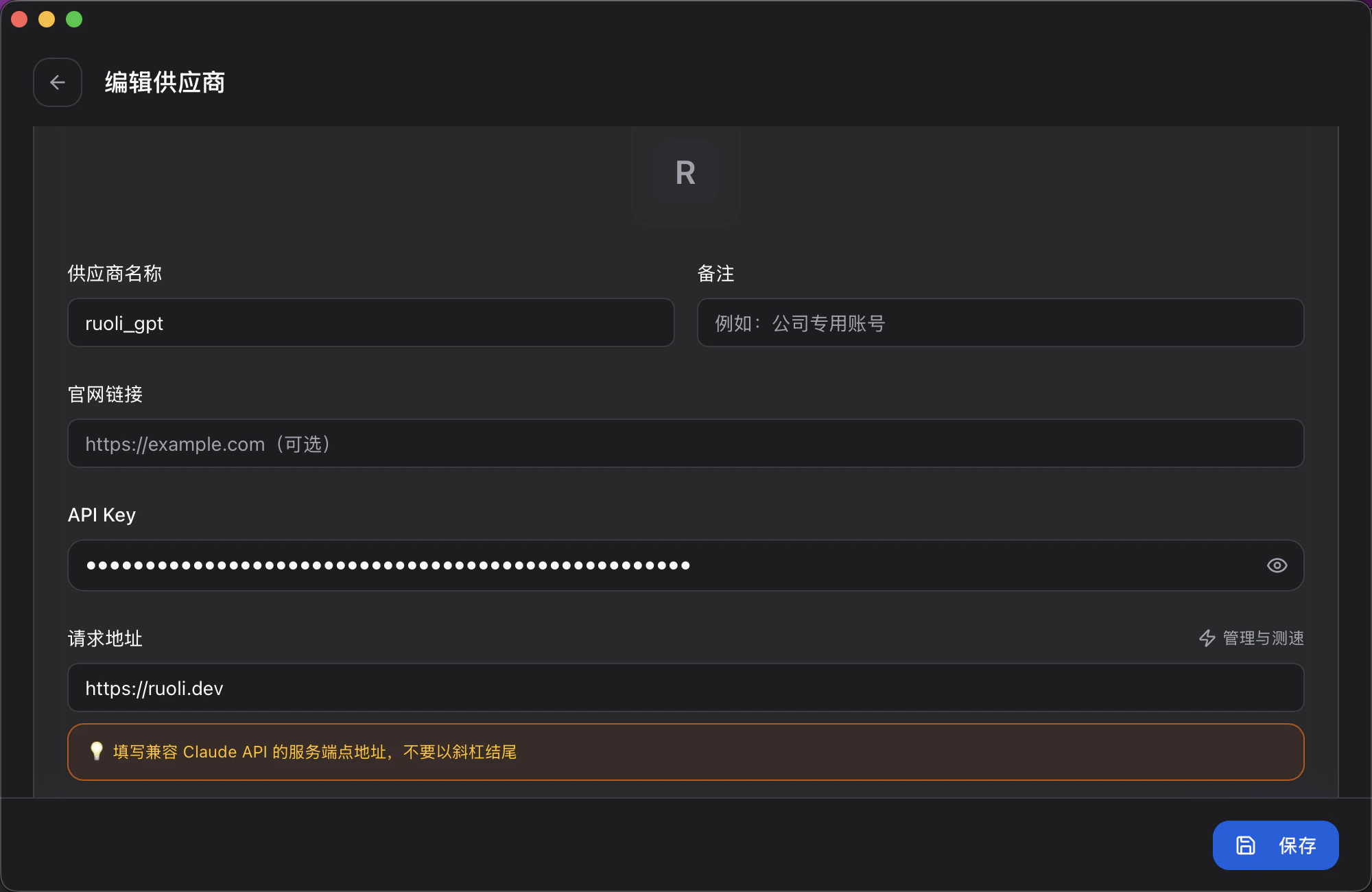 | 字段 | 填写内容 |
| ------- | ---------------------- |
| 供应商名称 | 自定义,如 `ruoli_codex` |
| API Key | 你的 Key |
| 请求地址 | `https://ruoli.dev/v1` |
## 手动配置
编辑 `~/.codex/config.toml`:
```toml theme={null}
model = "claude-sonnet-4-20250514"
model_provider = "ruoli"
[model_providers.ruoli]
name = "ruoli"
base_url = "https://ruoli.dev/v1"
env_key = "ruoli_API_KEY"
wire_api = "responses"
```
设置环境变量:
```bash theme={null}
export ruoli_API_KEY=sk-你的KEY
```
## 切换模型
修改 `config.toml` 中的 `model` 字段,或启动时指定:
```bash theme={null}
codex --model gpt-4o
```
也可以在 CC Switch 中切换模型。
**官方文档**:[developers.openai.com/codex](https://developers.openai.com/codex)
| 字段 | 填写内容 |
| ------- | ---------------------- |
| 供应商名称 | 自定义,如 `ruoli_codex` |
| API Key | 你的 Key |
| 请求地址 | `https://ruoli.dev/v1` |
## 手动配置
编辑 `~/.codex/config.toml`:
```toml theme={null}
model = "claude-sonnet-4-20250514"
model_provider = "ruoli"
[model_providers.ruoli]
name = "ruoli"
base_url = "https://ruoli.dev/v1"
env_key = "ruoli_API_KEY"
wire_api = "responses"
```
设置环境变量:
```bash theme={null}
export ruoli_API_KEY=sk-你的KEY
```
## 切换模型
修改 `config.toml` 中的 `model` 字段,或启动时指定:
```bash theme={null}
codex --model gpt-4o
```
也可以在 CC Switch 中切换模型。
**官方文档**:[developers.openai.com/codex](https://developers.openai.com/codex)